Meta Data Management
Meta-data management operations can be carried out within the FPMA Admin Tool, primarily under the Markets, Commodities, Measure Units, Sources, Price Types, Remote Series, and Virtual Markets menu items.
Markets

The Markets menu item displays a list of all the markets included in the database, with each market representing the geographical area where the pricing data has been gathered.
To guarantee the uniqueness of markets in the database, two constraints are enforced: the pairing of the ISO3 country code with the Market Name, and the ISO3 country code with the Market Code. Consequently, attempting to create a new market record that shares the same ISO3 country code and Market Name or Market Code as an existing one will result in an error message.
Each market record includes the following information: ISO3 country code, administrative unit 1, administrative unit 2, market name, market type, market code, latitude, longitude, market information, virtual markets, child markets, and ID.
Refer to Field Names and Descriptions for more information.
The Main Navigation Bar provides users with access to the following functions:
- Create Market - enables users to add a new market by inputting information directly into the system. A new dialog box appears, providing the specific fields necessary for adding a new market. Fields that are mandatory are indicated with an asterisk (*).
- Upload CSV Market - enables bulk uploading of market records. To use this function, click on the
Upload CSV Marketicon, which will open the CSV upload window. - Reload - enables users to view updated query results once specific tasks have been completed.
- Delete - enables the user to remove selected market records from the database.
- Export Options - enables users to export selected market records in three different formats:
CSV,Excel, orPDF. Users can download either the selected series, those that match certain criteria, or all records.
Commodities

The Commodities menu item displays a list of all the commodities included in the database, with each commodity representing the primary product whose price is being reported.
To guarantee the uniqueness of a commodity, two constraints are enforced: the pairing of the ISO3 country code with the Commodity Name, and the ISO3 country code with the Commodity Code. Consequently, attempting to create a new commodity record that shares the same ISO3 country code and either the Commodity Name or Commodity Code with an existing record will trigger an error message.
Each commodity record includes the following information: ISO3 country code, HS Class Code, Commodity Code, Commodity Name, Market Season Start, Image URL, Commodity Info, Alternative Code, Alternative Name, and ID.
Refer to Field Names and Descriptions for more information.
The Main Navigation Bar provides users with access to the following functions:
- Create Commodity - enables users to add a new commodity by inputting information directly into the system. This action triggers a new dialog box containing the specific fields necessary for the addition of a new commodity. Fields that are mandatory are indicated with an asterisk (*).
- Reload - enables users to view updated query results once specific tasks have been completed.
- Upload CSV Commodity - enables the bulk uploading of commodity records. To use this feature, click on the
Upload CSV Commodityicon, which will open the CSV upload window. - Delete - enables the user to remove selected commodity records from the database.
- Export Options - enables users to export selected commodity records in three formats:
CSV,Excel, orPDF. Users can download the chosen series, those that meet specific criteria, or all records.
Measure Units

The Measure Units menu item displays a list of all the measure units included in the database, with each measure unit representing the standard of measurement for a given commodity at the observed price.
To guarantee the uniqueness of the measurement unit, two constraints are established: one involving the combination of the ISO3 country code and MU Code, and the other involving the ISO3 country code and MU Label. Consequently, attempting to create a new measurement unit record with an existing combination of ISO3 country code and MU Code or MU Label will result in an error message.
Each measure unit record includes the following information: ISO3 country code, MU Code, MU Label, MU Description, Conversion Factor, and ID.
Refer to Field Names and Descriptions for more information.
The Main Navigation Bar provides users with access to the following functions:
- Create MeasureUnit - enables users to introduce a new measurement unit by inputting details directly into the system. This function triggers a dialog box that presents the necessary fields for adding a new unit, with mandatory fields indicated by an asterisk (*).
- Reload - enables users to view updated query results once specific tasks have been completed.
- Upload CSV MeasureUnit - facilitates the bulk uploading of measure unit records. To access the CSV upload window, click on the
Upload CSV Measure Uniticon, which will open the CSV upload window. - Delete - enables users to remove selected measurement unit records from the database.
- Export Options - enables users to export selected measurement unit records in three different formats:
CSV,Excel, orPDF. Users can download the chosen series, those that meet specific criteria, or all records.
Sources
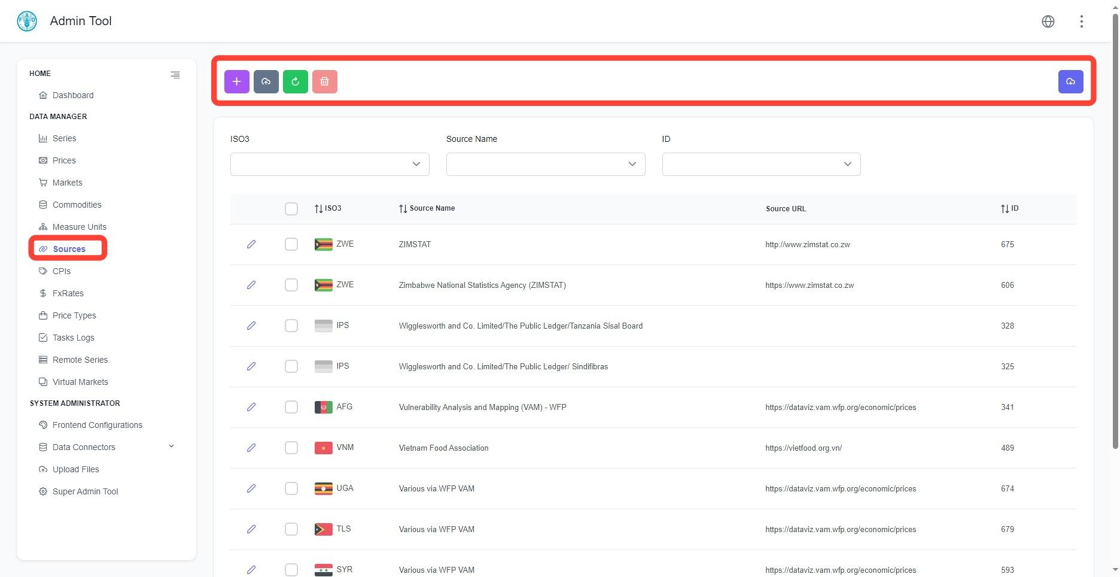
The Sources menu item displays a list of all the sources loaded in the database, with each source representing the entity from which specific price data originates.
To guarantee the uniqueness of the source, there is a constraint involving the combination of the ISO3 country code and the Source Name. Consequently, attempting to create a new Source record with an identical ISO3 country code and Source Name as an existing one will result in an error message.
Each source record includes the following information: ISO3 country code, Source Name, Source URL, and ID.
Refer to Field Names and Descriptions for more information.
The Main Navigation Bar provides users with access to the following functions:
- Create Source - enables users to add a new source by inputting information directly into the system. This action opens a dialog box with the necessary fields for adding a source, with mandatory fields marked by an asterisk (*).
- Upload CSV Source - facilitates the bulk uploading of source records. To access the CSV upload window, click on the
Upload CSV Sourceicon, which will open the CSV upload window. - Reload - allows users to view updated query results after certain tasks have been completed.
- Delete - permits users to remove selected source records from the database.
- Export Options - enables users to export selected source records in three formats:
CSV,Excel, orPDF. Users can download the series they select, those that meet specified criteria, or all records.
Price Types

The Price Types menu item displays the list of all price categories stored in the database, with each category denoting the classification of prices at which commodities are sold, such as retail, wholesale, or export prices.
A unique constraint is enforced on the Price Type field in the price type table to guarantee data uniqueness. Consequently, attempting to create a new Price Type record with a name that already exists in the database will trigger an error message.
Refer to Field Names and Descriptions for more information.
The Main Navigation Bar provides users with access to the following functions:
- Create PriceType - enables users to add a new price type by inputting information directly into the system. This function opens a dialog box with the necessary fields for adding a new price type, with mandatory fields indicated by an asterisk (*).
- Reload - refreshes the query results after certain tasks are completed.
- Delete - permits users to remove selected price type records from the database.
- Export Options - provides the capability to export selected price type records in three formats:
CSV,Excel, orPDF. Users can download the series they select, those that meet specific criteria, or all records.
Remote Series

The Remote Series menu item displays all the remote series available in the database. Price Series can be imported from other instances of the FPMA Tool, allowing for the copying and synchronization of price records from one installation of the FPMA Tool to another.
Each Remote Series record includes the following information: commodity name, market name, source name, price type, currency, measure unit, local UUID, remote URL, remote UUID, version, and active.
Refer to Field Names and Descriptions for more information.
The Main Navigation Bar provides users with access to the following functions:
- Import new series - opens a dialogue box, enabling the user to import a series from another FPMA Tool instance as follows:
- Enter the target FPMA Tool version in the
Select tool versionfield. - Use the drop-down list in the
Enter API URLfield to select the remote instance, or enter the FPMA tool URL address up to the hashtag symbol/#/. - Enter the UUID of the target series in the
Enter Identifierfield. - Click
Fetch Datato display the series details to be imported and to enable the submission of theIMPORT SERIESTask, which transfers the data from the remote to the local instance.
- Enter the target FPMA Tool version in the
- Reload - allows users to view updated query results after certain tasks have been executed.
- Export Options - permits users to export selected remote series records in
CSV,Excel, orPDFformats. Users can download the selected series, those matching specific criteria, or all records.
Importing Series also creates related foreign keys, such as Market, Commodity, etc. A night Task synchronizes the local series with the remote series. This task can be enabled or disabled by changing the Active Flag for each record.
Virtual Markets

The Virtual Markets menu item lists all the Virtual Markets present in the database. These Virtual Markets represent the weighted average prices from various markets and can be utilized to formulate indexes or national averages.
Users can establish Virtual Markets by initially creating a new market (refer to the Markets discussion) and subsequently associating this new market with other contributing physical markets (also known as child markets). A designated Task then computes the average price, taking into account the weights allocated to each of the contributing physical markets.
Each Virtual Markets record includes the following information: country, market type, admin unit 1, and market name.
Refer to Field Names and Descriptions for more information.
The Main Navigation Bar provides users with access to the following functions:
- Link Markets - This feature opens a window that enables the user to link the parent Virtual Market with physical regular markets. By clicking the pencil icon next to a physical regular market, the user can modify its contribution weight to the Virtual Market.
- Reset Calculations - This function is utilized when there are changes in the Virtual Market structure, such as weights or contributing markets. It clears all associated Virtual Market prices.
- Trigger Averaging - This action initiates a task to calculate the prices for the Virtual Market.
- Reload - This option refreshes the display, allowing the user to view the latest query results after certain tasks have been executed.
- Delete - This command severs the connection between the Virtual Market and its associated physical regular markets. It does not remove the Virtual Market or any contributing physical market prices from the database.
Task Logs

The Task Logs menu item in the FPMA Tool lists all the tasks that have been submitted. By selecting a task, you can view more details about it. Additionally, tasks can be sorted according to user, file name, record type, and status.
Data manipulation within the FPMA tool occurs primarily through the execution of specialized programs. These programs contain the logic required to maintain constraints and guarantee consistency. A Task represents the execution of one such program. A Task Log records details about the submitted program, its parameters, and its completion status. Task Logs are also accessible in the User Panel of the Price Viewer.
Each Task Logs record includes the following information: user, file name, record type, status, submitted on, finished on, and duration.
Refer to Field Names and Descriptions for more information.
The Main Navigation Bar provides users with access to the following functions:
- Reload - enables users to view updated query results once specific tasks are completed.
- Delete - allows users to remove selected task records from the database.
- Export Options - provides users with the ability to export selected task records in three formats:
CSV,Excel, orPDF. Users can download the selected task records based on specified filters or all records.
Field Names and Descriptions
- Active - indicates if a series is currently active in the database, with possible values being true or false.
- Admin Unit 1 - is the level 1 administrative unit at which individual markets are defined for each country in the database.
- Admin Unit 2 - is the level 2 administrative unit at which markets can be defined for reporting purposes.
- Calculated - indicates if a price value has been computed from the database, with possible values being true or false.
- Child Markets - are previously defined markets that have been used in the creation of a Virtual Market within the database.
- Collected - indicates if a price value originates from the FPMA Data Collection App.
- Commodity Code - is an alphanumeric code to uniquely identify different commodity types.
- Commodity Info, Alternative Code, and Alternative Name - are additional fields to record supplementary information about the Commodity.
- Commodity Name - is the name of the commodity.
- Conversion Factor - is the factor of conversion to 1 kilogram (i.e., 0.001 for tonnes). This allows displaying and comparing Series in the Price Viewer using a common unit of measure.
- Date - is the reference date for the FxRate table.
- Descriptor - is a description of the CPI indicator, i.e., Consumer Price Index.
- HS Class Code - is the 4-digit second-level Harmonized System (HS) code for the commodity.
- ID - is the unique identifier associated with each record.
- Image URL - allows the user to upload an image of the commodity, where available, to be visualized in the information tab of the Price Viewer.
- ISO3 - is the Alpha-3 code for the country associated with a particular market.
- Latitude and Longitude - allow the user to enter geographical coordinates for each market for visualization in the Map View of the Price Viewer.
- Local UUID - is the unique identifier for the active instance of the FPMA Tool.
- Market Code - is an alphanumeric code to uniquely identify markets for each country in the database.
- Market Info - can be used to enter additional information about the market, for example, if it is a Wholesale Market, an Urban Market, or a Market specialized in particular commodities.
- Market Name - is the name of the market as defined by the user.
- Market Season Start - is a number corresponding to the first month of the market season (1=January through 12=December) for the commodity. If no market season is available or known, then the default entry is 1. This information is used to display prices by market season or on a year-by-year basis in the Price Viewer.
- Market Type - provides information on the administrative level of the market, e.g., Province Capital, District Capital.
- Max - price value for a given time period.
- Min - price value for a given time period.
- MU Code - is an alphanumeric code to uniquely identify different units of measurement.
- MU Description - is a free text description of the unit of measurement.
- MU Label - is a standardized classification of the unit of measurement that allows for conversion to a common unit of measure, where applicable.
- Nominal Currency Code - is the currency code for the local currency in which prices are being reported.
- Period - is the reference date for the CPI value.
- Periodicity - is set to default as monthly periodicity. It can only be set to correspond to one of the available periodicities, i.e., daily, weekly, or monthly.
- Price Type - is a descriptor for the price type.
- Reference Currency Code - is the code for the reference currency in the FPMA Tool, which is currently set to be the U.S. dollar.
- Remote UUID - is the unique identifier for the remote instance of the FPMA Tool.
- Source Name - is the name of the institution providing the data.
- Source URL - is a URL link for direct access to the institution providing the data.
- Value - is the numeric value of the CPI or FxRate.
- Version - refers to the FPMA Tool version, i.e., v3 for version 3 and v4 for version 4.
- Virtual Markets - are markets that have been created by aggregating information from other previously defined markets within the database.
The pencil symbol next to each record opens a new dialog box, which allows the user to edit individual records. Any updates to an individual record will be immediately reflected in the related series and price records